发现问题
线上服务重启,好在抓到了线上服务的dump文件,下载到本地进行分析。
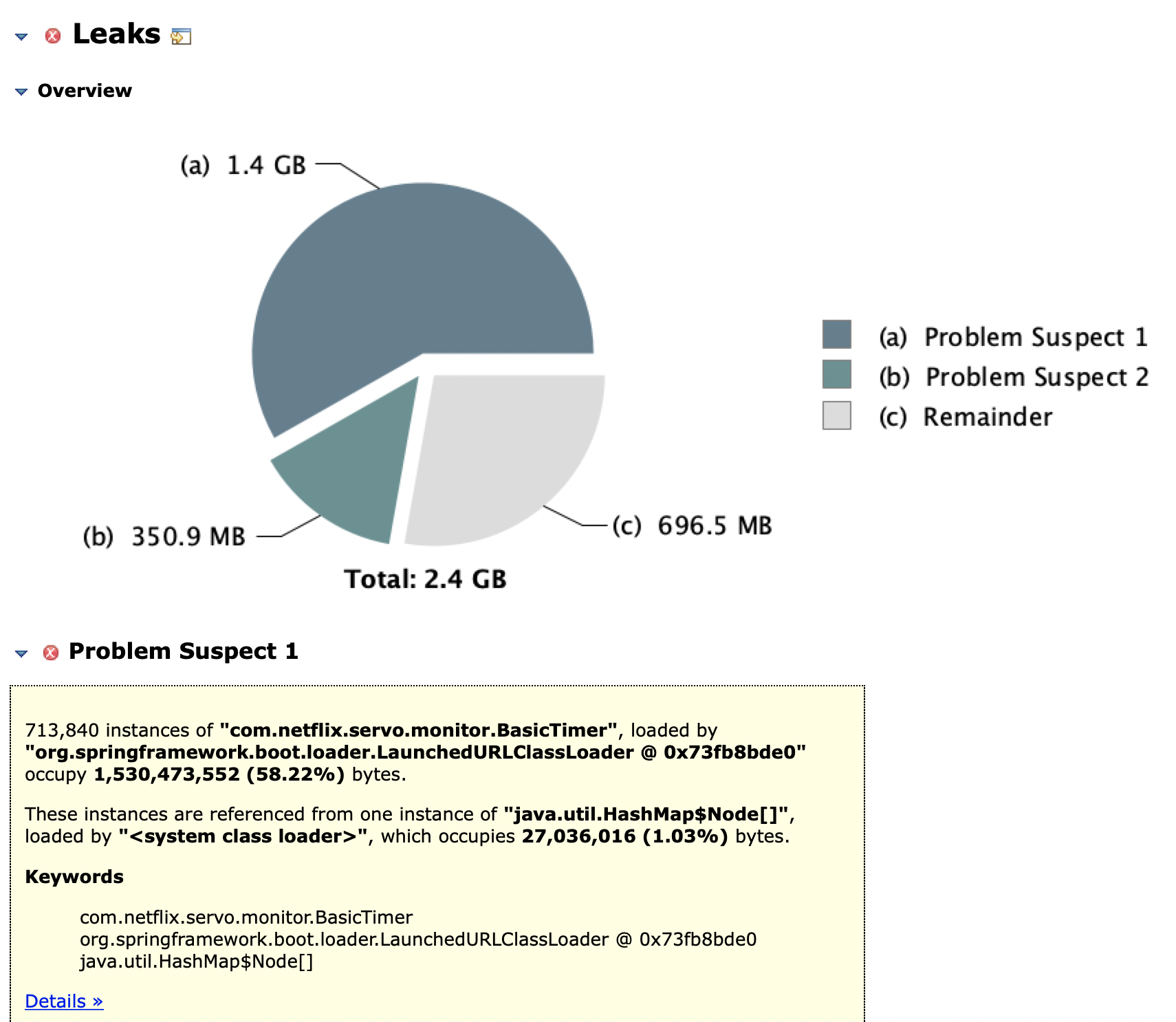
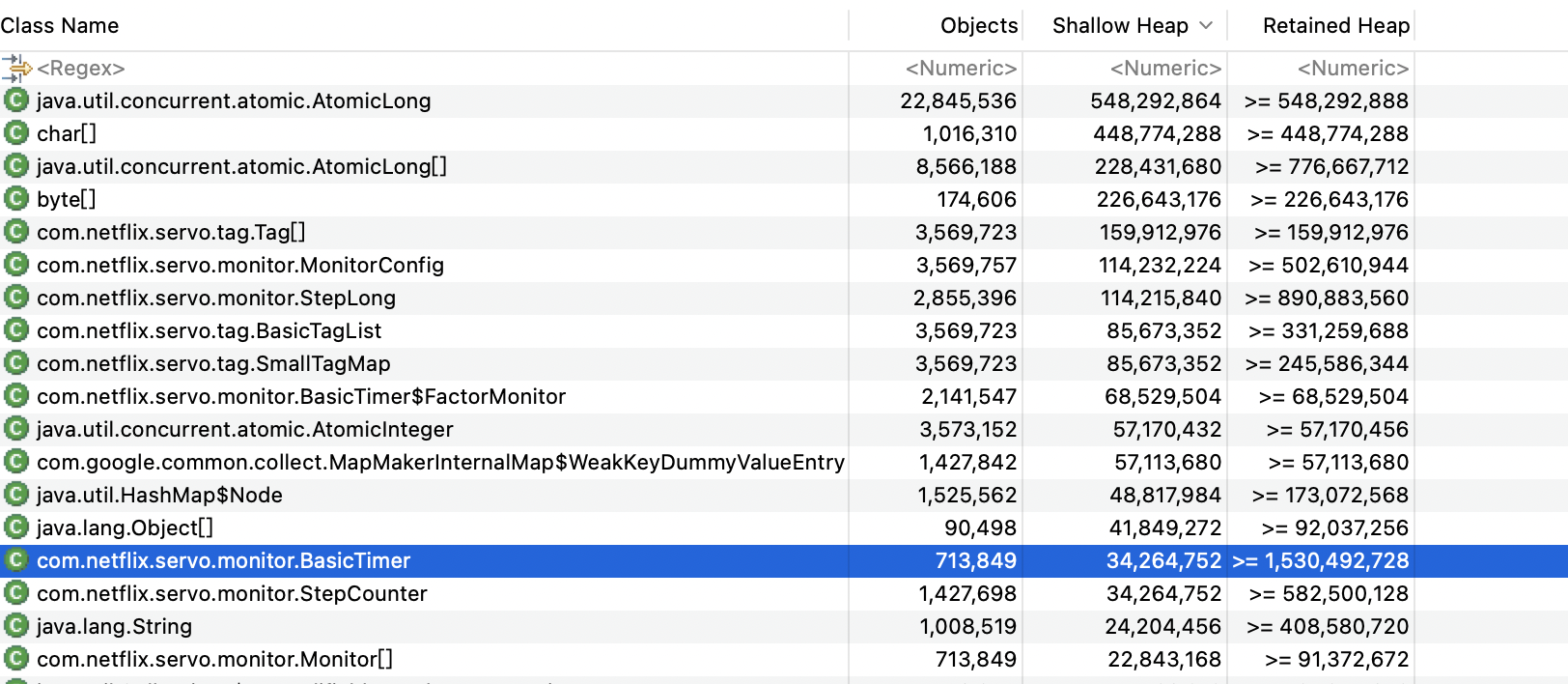
使用MAT打开快照文件,此处省略掉使用MAT的过程,分析发现有大量的com.netflix.servo.monitor.BasicTimer未释放,且被org.springframework.cloud.netflix.metrics.servo.ServoMonitorCache占用。

分析
在工程中查找到ServoMonitorCache类,发现在spring-cloud-netflix-core包下,然后打开该jar包,查看其spring.factories去查看是那里自动配置生成了该类,找到org.springframework.cloud.netflix.metrics.servo.ServoMetricsAutoConfiguration中自动配置,然后再搜索那里使用了该类,在org.springframework.cloud.netflix.metrics.MetricsInterceptorConfiguration中发现了ServoMonitorCache对象的使用。看到metrics就明白,是对服务的监控对象。代码如下:
@Configuration
@ConditionalOnProperty(value = "spring.cloud.netflix.metrics.enabled", havingValue = "true", matchIfMissing = true)
@ConditionalOnClass({ Monitors.class, MetricReader.class })
public class MetricsInterceptorConfiguration {

    @Configuration
    @ConditionalOnWebApplication
    @ConditionalOnClass(WebMvcConfigurerAdapter.class)
    static class MetricsWebResourceConfiguration extends WebMvcConfigurerAdapter {
        @Bean
        MetricsHandlerInterceptor servoMonitoringWebResourceInterceptor() {
            return new MetricsHandlerInterceptor();
        }

        @Override
        public void addInterceptors(InterceptorRegistry registry) {
            registry.addInterceptor(servoMonitoringWebResourceInterceptor());
        }
    }

    @Configuration
    @ConditionalOnClass({ RestTemplate.class, JoinPoint.class })
    @ConditionalOnProperty(value = "spring.aop.enabled", havingValue = "true", matchIfMissing = true)
    static class MetricsRestTemplateAspectConfiguration {

        @Bean
        RestTemplateUrlTemplateCapturingAspect restTemplateUrlTemplateCapturingAspect() {
            return new RestTemplateUrlTemplateCapturingAspect();
        }

    }

    @Configuration
    @ConditionalOnClass({ RestTemplate.class, HttpServletRequest.class })   // HttpServletRequest implicitly required by MetricsTagProvider
    static class MetricsRestTemplateConfiguration {

        @Value("${netflix.metrics.restClient.metricName:restclient}")
        String metricName;
                /*
                  *此处为关键代码
                  *编号1
                  */
        @Bean
        MetricsClientHttpRequestInterceptor spectatorLoggingClientHttpRequestInterceptor(
                Collection<MetricsTagProvider> tagProviders,
                ServoMonitorCache servoMonitorCache) {
            return new MetricsClientHttpRequestInterceptor(tagProviders,
                    servoMonitorCache, this.metricName);
        }

        @Bean
        BeanPostProcessor spectatorRestTemplateInterceptorPostProcessor() {
            return new MetricsInterceptorPostProcessor();
        }
                //编号2
        private static class MetricsInterceptorPostProcessor
                implements BeanPostProcessor, ApplicationContextAware {
            private ApplicationContext context;
            private MetricsClientHttpRequestInterceptor interceptor;

            @Override
            public Object postProcessBeforeInitialization(Object bean, String beanName) {
                return bean;
            }

            @Override
            public Object postProcessAfterInitialization(Object bean, String beanName) {
                if (bean instanceof RestTemplate) {
                    if (this.interceptor == null) {
                        this.interceptor = this.context
                                .getBean(MetricsClientHttpRequestInterceptor.class);
                    }
                    RestTemplate restTemplate = (RestTemplate) bean;
                    // create a new list as the old one may be unmodifiable (ie Arrays.asList())
                    ArrayList<ClientHttpRequestInterceptor> interceptors = new ArrayList<>();
                    interceptors.add(interceptor);
                    interceptors.addAll(restTemplate.getInterceptors());
                    restTemplate.setInterceptors(interceptors);
                }
                return bean;
            }

            @Override
            public void setApplicationContext(ApplicationContext context)
                    throws BeansException {
                this.context = context;
            }
        }
    }
}在上面代码中编号1处,自动配置生成了MetricsClientHttpRequestInterceptor拦截器,然后把ServoMonitorCache采用构造器注入传入了拦截器;然后代码编号2处的postProcessAfterInitialization函数中,把该拦截器赋值给了RestTemplate,这是一个大家都很熟悉的对象。
然后进入MetricsClientHttpRequestInterceptor,核心代码如下:
@Override
    public ClientHttpResponse intercept(HttpRequest request, byte[] body,
            ClientHttpRequestExecution execution) throws IOException {
        long startTime = System.nanoTime();

        ClientHttpResponse response = null;
        try {
            response = execution.execute(request, body);
            return response;
        }
        finally {
            SmallTagMap.Builder builder = SmallTagMap.builder();
                        //编号3
            for (MetricsTagProvider tagProvider : tagProviders) {
                for (Map.Entry<String, String> tag : tagProvider
                        .clientHttpRequestTags(request, response).entrySet()) {
                    builder.add(Tags.newTag(tag.getKey(), tag.getValue()));
                }
            }
                        //编号4
            MonitorConfig.Builder monitorConfigBuilder = MonitorConfig
                    .builder(metricName);
            monitorConfigBuilder.withTags(builder);

            servoMonitorCache.getTimer(monitorConfigBuilder.build())
                    .record(System.nanoTime() - startTime, TimeUnit.NANOSECONDS);
        }
}编号3处代码,发现对象tagProviders,回过去看代码也是该拦截器构造时传入的参数;现在去看一下这个对象是什么,因为该对象是构造器注入的,说明也是由spring容器配置生成的,所以继续在autoconfig文件中查找,发现在org.springframework.cloud.netflix.metrics.servo.ServoMetricsAutoConfiguration中自动配置生成:
@Configuration
    @ConditionalOnClass(name = "javax.servlet.http.HttpServletRequest")
    protected static class MetricsTagConfiguration {
        @Bean
        public MetricsTagProvider defaultMetricsTagProvider() {
            return new DefaultMetricsTagProvider();
        }
}进入DefaultMetricsTagProvider,核心代码如下:
public Map<String, String> clientHttpRequestTags(HttpRequest request,
           ClientHttpResponse response) {
       String urlTemplate = RestTemplateUrlTemplateHolder.getRestTemplateUrlTemplate();
       if (urlTemplate == null) {
           urlTemplate = "none";
       }

       String status;
       try {
           status = (response == null) ? "CLIENT_ERROR" : ((Integer) response
                   .getRawStatusCode()).toString();
       }
       catch (IOException e) {
           status = "IO_ERROR";
       }

       String host = request.getURI().getHost();
       if( host == null ) {
           host = "none";
       }

       String strippedUrlTemplate = urlTemplate.replaceAll("^https?://[^/]+/", "");

       Map<String, String> tags = new HashMap<>();
       tags.put("method",   request.getMethod().name());
       tags.put("uri",     sanitizeUrlTemplate(strippedUrlTemplate));
       tags.put("status",   status);
       tags.put("clientName", host);

       return Collections.unmodifiableMap(tags);
}发现其就是分解了Http的客户端请求,其中关键就是method(get、post、delete等http方法)、status状态、clientName访问的服务域名、uri访问路径(包含参数)。
然后,返回去看代码编号4处,生成了一个对象com.netflix.servo.monitor.MonitorConfig,主要就是name和tags,name默认的就是restclient(可以在属性文件中修改);tags就是DefaultMetricsTagProvider中那些tag标签。
然后进入ServoMonitorCache.getTimer函数:
public synchronized BasicTimer getTimer(MonitorConfig config) {
        BasicTimer t = this.timerCache.get(config);
        if (t != null)
            return t;

        t = new BasicTimer(config);
        this.timerCache.put(config, t);

        if (this.timerCache.size() > this.config.getCacheWarningThreshold()) {
            log.warn("timerCache is above the warning threshold of " + this.config.getCacheWarningThreshold() + " with size " + this.timerCache.size() + ".");
        }

        this.monitorRegistry.register(t);
        return t;
}此处就很简单了,先在缓存中查找该MonitorConfig对象有没有,没有则新增一个BasicTimer,若有就更新该BasicTimer的参数,BasicTimer存储了各个接口的访问最大时间、最小时间、平均时间等。
分析到这里就明白了,如果每次的接口访问url都不一样,那么在DefaultMetricsTagProvider中解析的uri也就都不一样,最终导致了MonitorConfig对象不一样,所以接口调用一次,生成一个BasicTimer对象,久而久之也就打爆Jvm堆内存。
而我们线上的服务,由于很多都是通过参数来拼接url来调用内部或者外部的接口。
解决方案
- 修改调用方式,采用POST方式传参(针对我们的服务,尤其是三方的服务,这种方式明显不适合。)
- 去掉该拦截器
回到MetricsInterceptorConfiguration,看到如下代码:
@Configuration
@ConditionalOnProperty(value = "spring.cloud.netflix.metrics.enabled", havingValue = "true", matchIfMissing = true)
@ConditionalOnClass({ Monitors.class, MetricReader.class })
public class MetricsInterceptorConfiguration {熟悉springboot的一看就明白,只需要将属性spring.cloud.netflix.metrics.enabled置为false即可关闭该自动配置文件类。
除非注明,否则均为李锋镝的博客原创文章,转载必须以链接形式标明本文链接



文章评论