本文最后更新于 2025年11月21日,距今已 306 天,其中的信息可能已经发生变化,请注意甄别。
今天逛博客,看到其他大佬的博客有个时间进度条的小插件,意动之下,就决定自己也搞一个玩玩。
主要功能是通过短码显示今天、本周、本月、今年已经过去了多久,当然也可以通过短码指定显示的类型,类型分别定义为:'day' - 今天, 'week' - 本周,'month' - 本月, 'year' - 今年。
使用方式很简单,示例如下:
[ countdown ]:不指定类型,全部展示。[ countdown type="day" ]:只展示当天的倒计时。[ countdown type="day,week" ]:展示当天和本周的倒计时。
插件整体颜色使用了莫兰迪色系,当然大家也可以根据自己的喜好进行调整。
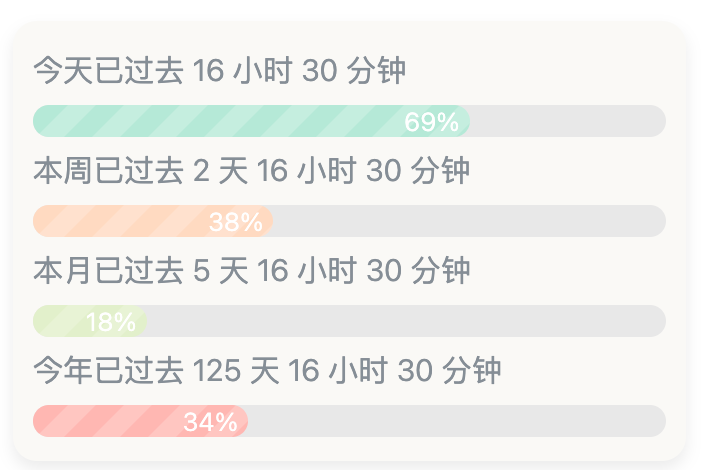
整个插件代码如下,需要的自取:
<?php

// 定义短码处理函数
function countdown_shortcode( $atts ) {
    $default_atts = array(
        'type' => 'all', // 默认全部展示
        'title' => ''
    );
    $atts = shortcode_atts( $default_atts, $atts );

    $types = explode(',', str_replace(' ', '', $atts['type']));
    if (in_array('all', $types)) {
        $types = ['day', 'week','month', 'year'];
    }

    $valid_types = ['day', 'week','month', 'year'];
    $color_map = [
        'day' => '#B5EAD7',
        'week' => '#FFDAC1',
        'month' => '#E2F0CB',
        'year' => '#FFB7B2'
    ];

    $style = '<style>
       .countdown-container {
            background-color: #FAF9F6;
            border-radius: 12px;
            padding: 10px;
            box-shadow: 0 4px 8px rgba(0, 0, 0, 0.08);
        }
       .countdown-item {
            height: 50px;
            position: relative;
            max-height: 80px;
            overflow: hidden;
        }
       .countdown-text {
            color: #868e96;
            font-size: 0.95em;
        }
       .countdown-progress-bar {
            height: 16px;
            background-color: #E8E8E8;
            border-radius: 8px;
            overflow: hidden;
            position: relative;
            margin-top: 3px;
        }
       .progress-bar-fill {
            height: 100%;
            border-radius: 8px;
            transition: width 1s ease;
            position: relative;
            background-image: repeating-linear-gradient(
                -45deg,
                rgba(255, 255, 255, 0.2),
                rgba(255, 255, 255, 0.2) 10px,
                transparent 10px,
                transparent 20px
            );
            background-size: 28px 28px;
            animation: spiral-move 1s linear infinite;
        }
       .countdown-percentage {
            font-size: 0.8em;
            color: #fff;
            position: absolute;
            top: 50%;
            right: 5px;
            transform: translateY(-50%);
            z-index: 2;
        }

        @keyframes spiral-move {
            0% {
                background-position: 0 0;
            }
            100% {
                background-position: 28px 0;
            }
        }
    </style>';

    $script = '<script>
        function updateCountdown() {
            const now = new Date();
            const types = '. json_encode($types). ';
            const colorMap = '. json_encode($color_map). ';
            const validTypes = '. json_encode($valid_types). ';

            types.forEach(type => {
                if (!validTypes.includes(type)) return;

                let elapsed = 0;
                let total = 0;
                let text = "";

                switch (type) {
                    case "day":
                        elapsed = now.getHours() * 3600 + now.getMinutes() * 60 + now.getSeconds();
                        total = 24 * 3600;
                        text = `今天已过去 ${Math.floor(elapsed / 3600)} 小时 ${Math.floor((elapsed % 3600) / 60)} 分钟`;
                        break;
                    case "week":
                        elapsed = (now.getDay() * 24 * 3600) + (now.getHours() * 3600) + (now.getMinutes() * 60) + now.getSeconds();
                        total = 7 * 24 * 3600;
                        text = `本周已过去 ${Math.floor(elapsed / (24 * 3600))} 天 ${Math.floor((elapsed % (24 * 3600)) / 3600)} 小时 ${Math.floor((elapsed % 3600) / 60)} 分钟`;
                        break;
                    case "month":
                        const year = now.getFullYear();
                        const month = now.getMonth() + 1;
                        const daysInMonth = new Date(year, month, 0).getDate();
                        elapsed = ((now.getDate() - 1) * 24 * 3600) + (now.getHours() * 3600) + (now.getMinutes() * 60) + now.getSeconds();
                        total = daysInMonth * 24 * 3600;
                        text = `本月已过去 ${Math.floor(elapsed / (24 * 3600))} 天 ${Math.floor((elapsed % (24 * 3600)) / 3600)} 小时 ${Math.floor((elapsed % 3600) / 60)} 分钟`;
                        break;
                    case "year":
                        const startOfYear = new Date(now.getFullYear(), 0, 1);
                        const diff = now - startOfYear;
                        elapsed = Math.floor(diff / 1000);
                        const isLeapYear = (new Date(now.getFullYear(), 1, 29).getDate() === 29);
                        total = (isLeapYear? 366 : 365) * 24 * 3600;
                        text = `今年已过去 ${Math.floor(elapsed / (24 * 3600))} 天 ${Math.floor((elapsed % (24 * 3600)) / 3600)} 小时 ${Math.floor((elapsed % 3600) / 60)} 分钟`;
                        break;
                }

                const percentage = Math.round((elapsed / total) * 100);
                const item = document.getElementById(`countdown-${type}`);
                if (item) {
                    const textElement = item.querySelector(".countdown-text");
                    const percentageElement = item.querySelector(".countdown-percentage");
                    const progressBarElement = item.querySelector(".progress-bar-fill");

                    textElement.textContent = text;
                    percentageElement.textContent = `${percentage}%`;
                    progressBarElement.style.width = `${percentage}%`;
                    progressBarElement.style.backgroundColor = colorMap[type];
                }
            });
        }

        document.addEventListener("DOMContentLoaded", () => {
            updateCountdown();
            setInterval(updateCountdown, 1000 * 60);
        });
    </script>';

    ob_start();
    echo $style;
    echo '<div class="countdown-container">';
    foreach ($types as $type) {
        if (!in_array($type, $valid_types)) continue;
        ?>
        <div class="countdown-item" id="countdown-<?php echo $type;?>">
            <span class="countdown-text"></span>
            <div class="countdown-progress-bar">
                <div class="progress-bar-fill">
                    <span class="countdown-percentage"></span>
                </div>
            </div>
        </div>
        <?php
    }
    echo '</div>';
    echo $script;
    return ob_get_clean();
}

add_shortcode('countdown', 'countdown_shortcode');
本来想搞一个最近的节假日的倒计时的,不过没有找到合适的JS库,遂作罢。
菜鸡是这样的。
除非注明,否则均为李锋镝的博客原创文章,转载必须以链接形式标明本文链接



文章评论